So you need a website, and money is tight. You have collected a handful of quotes, and even the lowest ones felt painful. Before you accept that cost, consider what you are actually paying for.
A large share of the early expense is not visual craft. It is preparation. Discovery calls, page mapping, and repeated debates about placement all consume professional hours. Those hours end up on your invoice.
A good deal of that preparation can be done on your own with AI. Not the visual design, but the wireframes. The structural frame of each page. Delivering a settled structure instead of a fuzzy brief shrinks the project and shortens the schedule.
It also tends to lower the price, even from a cheap web designer. Let’s walk through the process.
What Exactly Is a Wireframe?
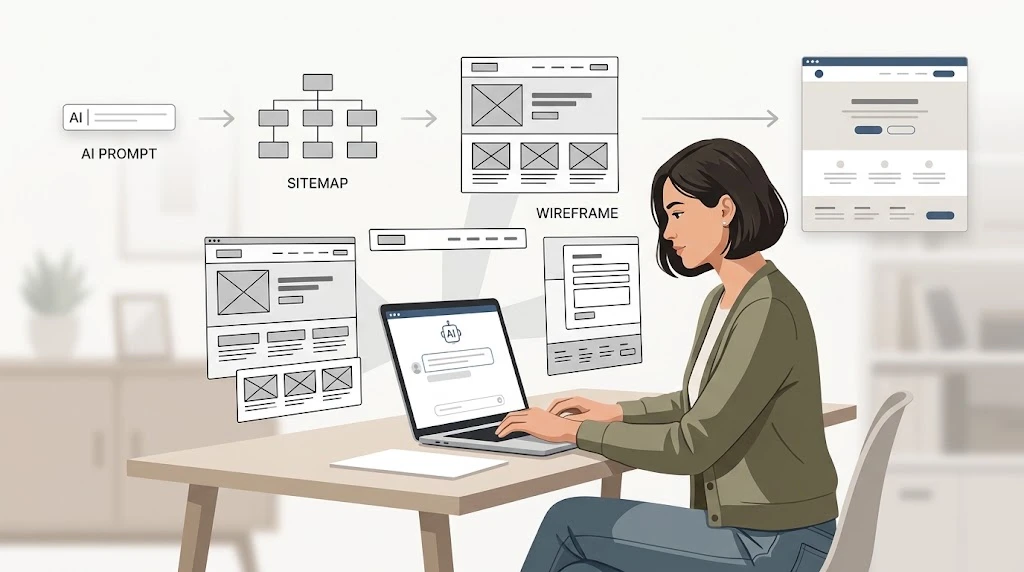
Picture a rough diagram of a web page. Boxes indicate image placement. Lines indicate text. Menus, buttons, and forms are positioned but unstyled.
There are no colors, fonts, or decorative elements. The wireframe resolves a single question: what goes where, and in what sequence?
This method exists because structure is inexpensive to change early on. Finished visual work is expensive to change later. Rearranging a section at the wireframe stage takes a moment. Rearranging it after the build means paying someone to undo completed work. Plenty of blown website design budgets trace back to structural decisions made too late.
Why This Approach Saves Money
Most professionals fold planning into their pricing. Sometimes it is an hourly rate. Sometimes it is a flat fee with padding. When you arrive with the structure already resolved, they move directly to visual work. Fewer meetings. Fewer revisions. Faster delivery.
Cost is driven by scope. Reduce the planning scope, and the quote falls. This holds everywhere. A cheap web designer and a large agency both price based on how much figuring-out remains.
There is a second saving that often goes unnoticed. Send the same wireframes to three professionals, and you receive three comparable quotes. Send a vague brief instead, and the numbers vary enormously. Each person is guessing at a different job. Those estimates cannot be fairly compared.
Step 1: Nail Down the Basics First
AI output can only be as good as your input. Begin with simple answers. What is the site meant to do? Sell, schedule, or explain? Who is it for? Be specific about the audience.
Which pages do you actually need? What single action matters most? Keep your answers to a short paragraph or two. That paragraph becomes your prompt. Skipping this step yields a generic site and far more cleanup later.
Step 2: Let AI Draft Your Sitemap
Open whatever AI assistant you already use. Paste your description and ask for a sitemap for your type of business. You will get a list of suggested pages. Now question it.
Ask what can be cut. A small business site usually works better with five or six pages than with a dozen. Every extra page means more writing, more website design effort, and more cost. Most visitors never read them.
Once the list looks right, the sitemap is finished. That is half the planning done.
Step 3: Generate the Wireframes
Now choose a tool. Relume takes a short business description and produces a sitemap plus wireframes for each page. It exports to Figma and Webflow, which most professionals already use. There is a free tier to try.
Uizard is similar. You describe what you want, and it drafts screens. It suits fast, rough layouts more than polished structure. A chatbot is the third path. It sounds basic, but it is the most flexible.
Ask the AI to split each page into sections, top to bottom. A homepage might produce a header, a hero with headline and button, three service highlights, a testimonial, a call to action, and a footer. Then sketch that list.
Honestly, paper works fine. Draw a box for each section, label it, and photograph it. Professionals regularly work from photos of rough sketches. If you want something cleaner, Figma’s free tier or Canva will do. You now have a wireframe for every page. Cost: an hour or two, nothing out of pocket.
Step 4: Test It Before You Pay Anyone
This step is free, so use it well. Walk through your own site the way a stranger would. Can the contact page be reached in one click from anywhere? Is the main action obvious within five seconds? Does every section earn its place?
Paste the layout back into the chatbot and ask what might confuse a first-time visitor. It is surprisingly good at catching buried contact details or two competing calls to action. Think about mobile too. Most tools default to desktop, but over half your visitors arrive on a phone.
Check that sections stack in a sensible order on a narrow screen.
Step 5: Hand It Over the Right Way
When you contact professionals, lead with a clear statement. The structure and content plan are done. You need visual design and build. Share the wireframes and the sitemap.
Ask for a quote against that exact scope. Say you will keep the structure unless they recommend a change. You have turned “I need a website” into “I need these six pages designed.” That is a smaller, clearer, cheaper job.
Any designer will quote it faster because there is less to guess at. This works whether you hire a cheap web designer or a mid-range studio.
Where AI Falls Short
Be honest about the limits. AI does not know your customers. Its layouts are competent but generic. It cannot tell you that your headline is dull or that your photos weaken credibility.
That judgment is why you still hire a professional. Think of it this way: AI gets you roughly sixty percent of the way. That sixty percent happens to be the planning-heavy part. The remaining forty percent is where skill matters most, and where visitors actually notice.
A Few Final Tips
Write real labels like “Book a free consultation” instead of “Click here.” Real labels force clearer thinking. Stay lean, and do not add pages just because the AI suggested them. Everything you add costs twice: once in website design and once in content.
Do not marry the wireframe. If the designer suggests moving a section, listen. You are paying for their judgment too. Keep it shareable. One tidy document with your sitemap, wireframes, and notes prevents confusion.
A confused designer is an expensive designer.
The Bottom Line
You are not skipping the designer, and you should not try. A wireframe is not a website any more than a floor plan is a house. But you do not need an architect to draw the floor plan either.
Do the structural work yourself. Use the AI tools while they are cheap or free. Spend your budget where it shows. You will spend less, launch faster, and walk into that first call prepared instead of hopeful. For anyone on a tight budget, that is the whole game.
Comments
No comments yet. Be the first to react!